
Restrova resources
How Yum Zone Uses Restrova for Ordering & Operations
Yum Zone uses Restrova apps, online ordering, POS, inventory, rider tracking, loyalty and multi-branch management.
Restrova · For restaurant owners
Yum Zone uses Restrova apps, online ordering, POS, inventory, rider tracking, loyalty and multi-branch management.
Request a Free DemoExplore the published ordering experience
The public listing provides the current description and store screenshots. Availability depends on the device and region.
Ordering across customer channels
Yum Zone uses branded Android and iOS customer apps and a Restrova ordering website. Its public Android description covers browsing menu categories and prices, available item options, delivery or pickup, favourites and order updates. The website is part of the confirmed scope; a verified public domain is not currently available here.
Counter orders, stock and delivery
POS/order management, inventory and rider tracking are confirmed parts of Yum Zone’s implementation. These services connect the customer-facing channels with the team’s order and fulfilment tools. Specific printer models, recipe deductions and dispatch rules are not established by the public app listing.
Loyalty and more than one branch
Yum Zone also uses loyalty/promotions and multi-branch management. This confirms the capabilities in its setup without specifying branch numbers, promotion rules or customer-retention outcomes. A restaurant comparing a similar setup should demonstrate its own offer conditions and branch access.
Evaluate the complete ordering setup
Start with an item that has options, then follow a sample order into administration. Review availability, delivery responsibility and the closing record. These are practical evaluation tasks for your restaurant, not a claim about measured results at Yum Zone.
Explore the solutions in this implementation
Review Restrova pricing, learn about the team, or return to customer implementations.
Bring your ordering workflow to a free demo
Bring your menu, branch count and current order workflow. We will walk through the relevant tools and agree the scope before you commit.
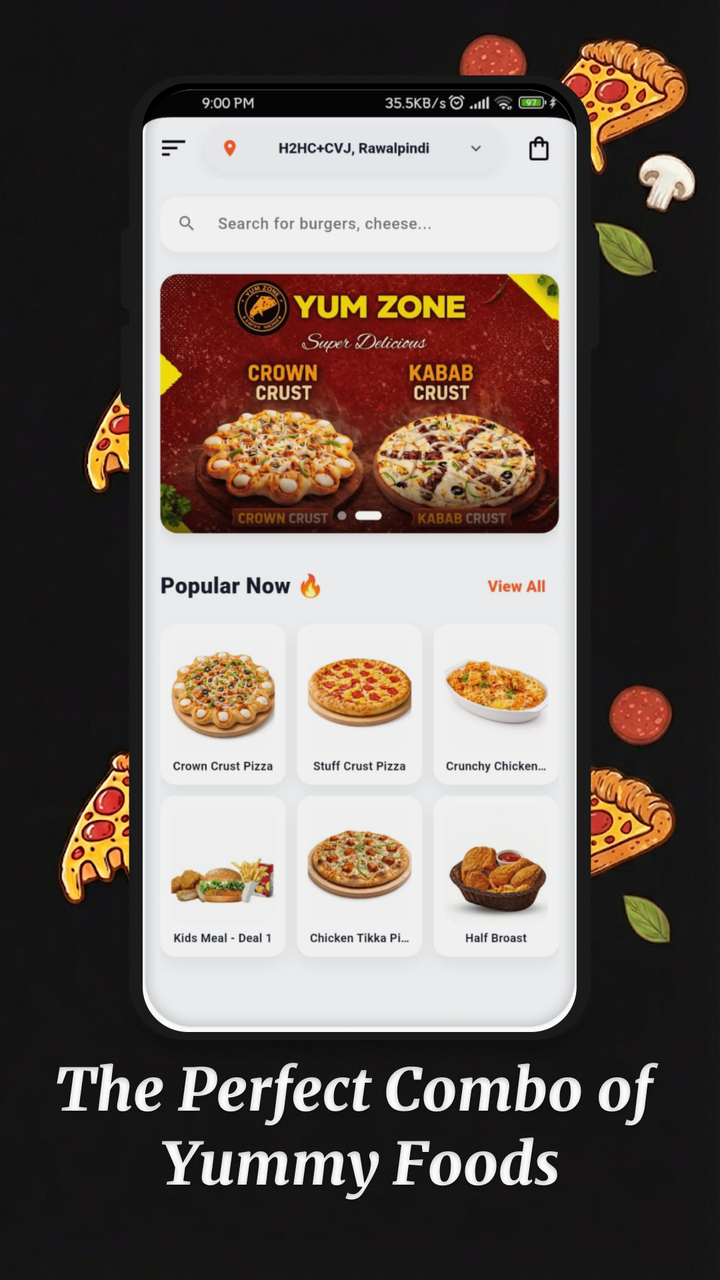
Public product evidence
Yum Zone: explore the published app
The published Android listing describes menu categories, item options, delivery or pickup, favourites and order updates.
Menu browsing → item choices → delivery or pickup → order updates
View the current Google Play listing
Use this implementation as a discussion starting point
Compare the visible customer journey with your own menu and fulfilment process. The owner-confirmed operational scope above is broader than the public app listing; its detailed configuration should be discussed separately. No customer quote, sales uplift or retention result is claimed.